 BerryCade
 7. Security profiles (Perfis de segurança)
7.1 IDS / IPS
BerryCade uses Suricata with the ET Open rules, updated automatically every day. The mode is chosen per zone (on the IDS/IPS screen itself or in Rede › Zonas (Network › Zones)) and can be turned on per policy:
| Modo (Mode) | Comportamento (Behavior) |
|---|---|
| Desligado (Off) | No inspection. |
| Alerta (IDS) (Alert) | Inspects and logs alerts without blocking. Recommended to start with and to measure CPU usage. |
| Bloqueio (IPS inline) (Block) | Drops traffic that matches malicious signatures. |
The Perfis de Segurança › IDS / IPS (Security Profiles › IDS / IPS) screen shows the mode buttons for each zone, rule status and updates, performance (CPU impact and NFQUEUE queues, with packets and drops) and recent alerts, which you can filter by zone. If Suricata stops, traffic keeps flowing (fail-open) so the network does not go down.
Warning: IPS uses a lot of memory. On a Raspberry Pi with little RAM, use Alert mode or turn on IPS only in the policies that need it.
7.2 Web filter (Filtro Web)
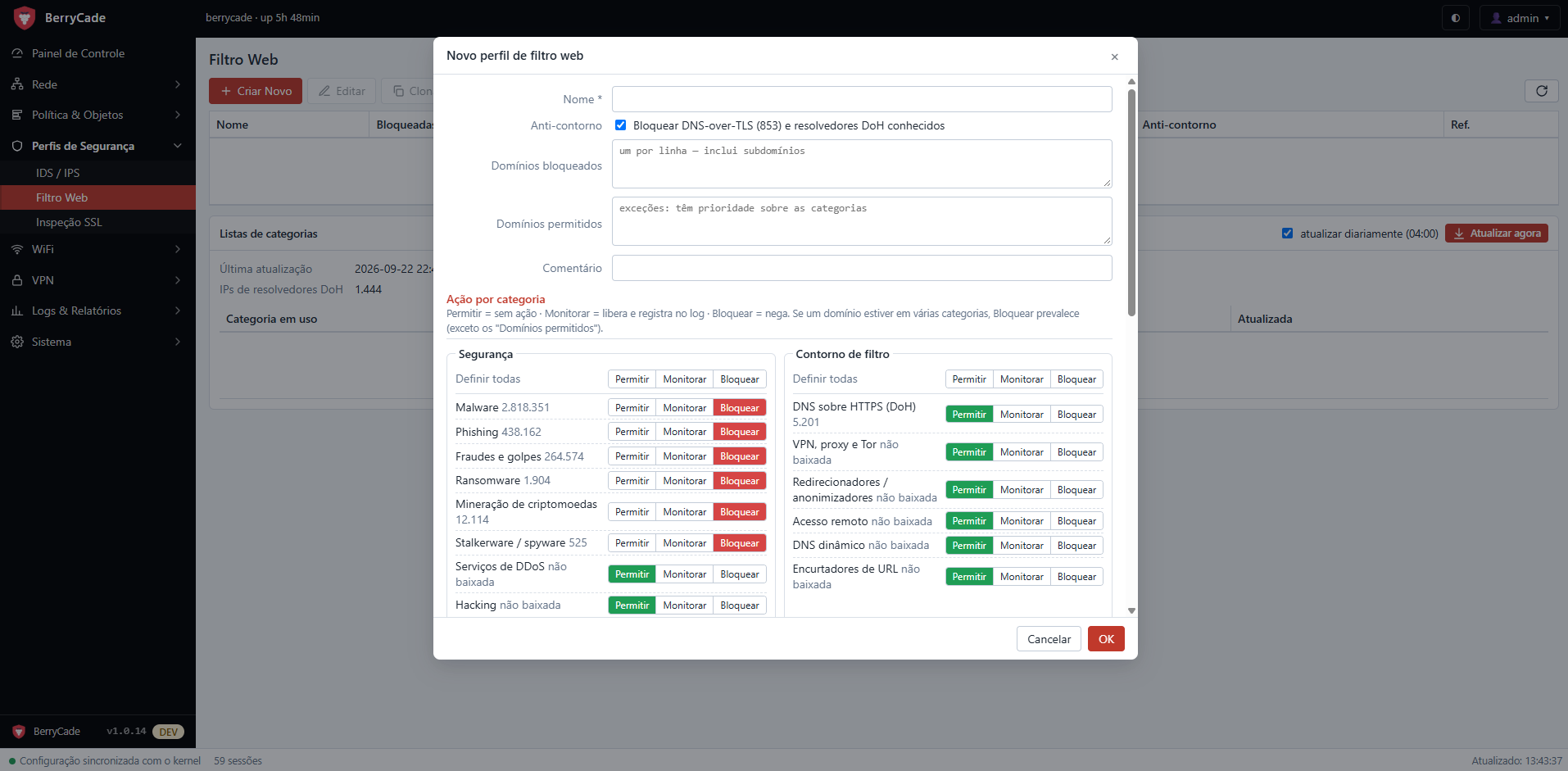
Figure 8 — New web filter profile
A web filter profile defines what to do with each website category. Once created, you select it in the Filtro Web (Web Filter) field of policies.
| Field | Description |
|---|---|
| Anti-contorno (Anti-bypass) | Blocks DNS over TLS (port 853) and known DNS over HTTPS (DoH) resolvers, which could be used to evade the filter. |
| Domínios bloqueados (Blocked domains) | One per line; includes subdomains. |
| Domínios permitidos (Allowed domains) | Exceptions that take priority over categories. |
| Ação por categoria (Action per category) | For each category: Permitir (Allow, no action), Monitorar (Monitor, allows and logs) or Bloquear (Block). “Definir todas” (Set all) changes the whole group. |
The category lists (UT1, Block List Project and HaGeZi) are downloaded on the device itself, updated daily at 04:00 or with the Atualizar agora (Update now) button. When a category shows as “não baixada” (not downloaded), it will be fetched on the next update. Blocked requests show a BerryCade block page (with deep SSL inspection) or fail name resolution.
7.3 SSL inspection (Inspeção SSL)
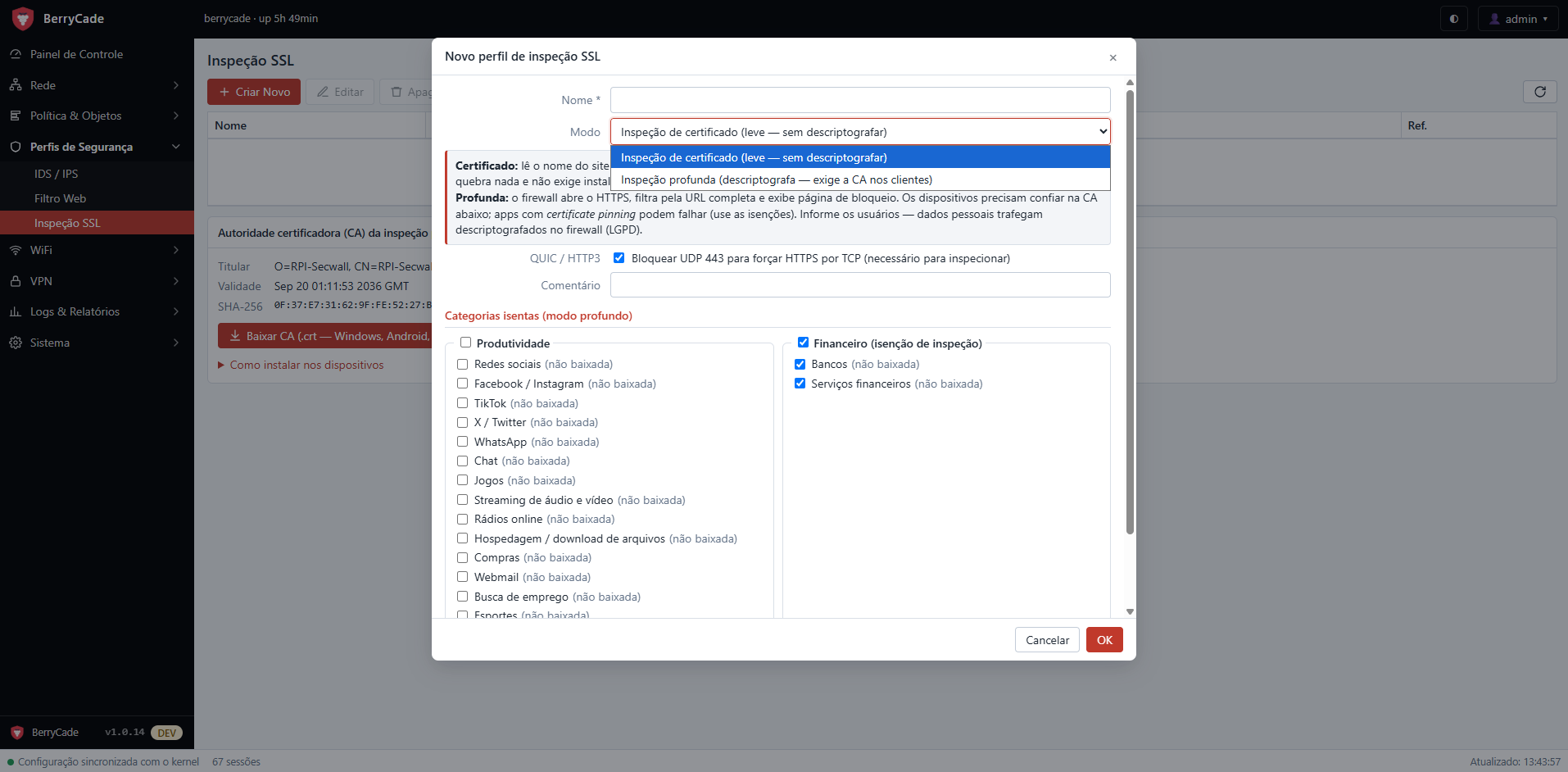
Figure 9 — New SSL inspection profile
| Modo (Mode) | Como funciona (How it works) |
|---|---|
| Inspeção de certificado (leve) (Certificate inspection, light) | Reads only the site name (SNI) to apply the web filter to HTTPS sites. It breaks nothing and does not require installing a certificate on devices. |
| Inspeção profunda (Deep inspection) | The firewall opens the HTTPS traffic, filters by the full URL and shows the block page. Devices must trust the BerryCade CA. |
- QUIC / HTTP3: blocks UDP 443 to force HTTPS over TCP, which is required for inspection.
- Categorias isentas (Exempt categories, deep mode): traffic that is never opened — by default, banks and financial services.
- You download the CA on the screen itself (Baixar CA, Download CA), with installation instructions for Windows, Android, iOS and macOS.
Warning: with deep inspection, personal data travels decrypted through the firewall. Inform network users (LGPD, Brazil's data protection law) and use exemptions for banks, health and apps with certificate pinning.