 BerryCade
 5. Network (Rede)
5.1 Interfaces
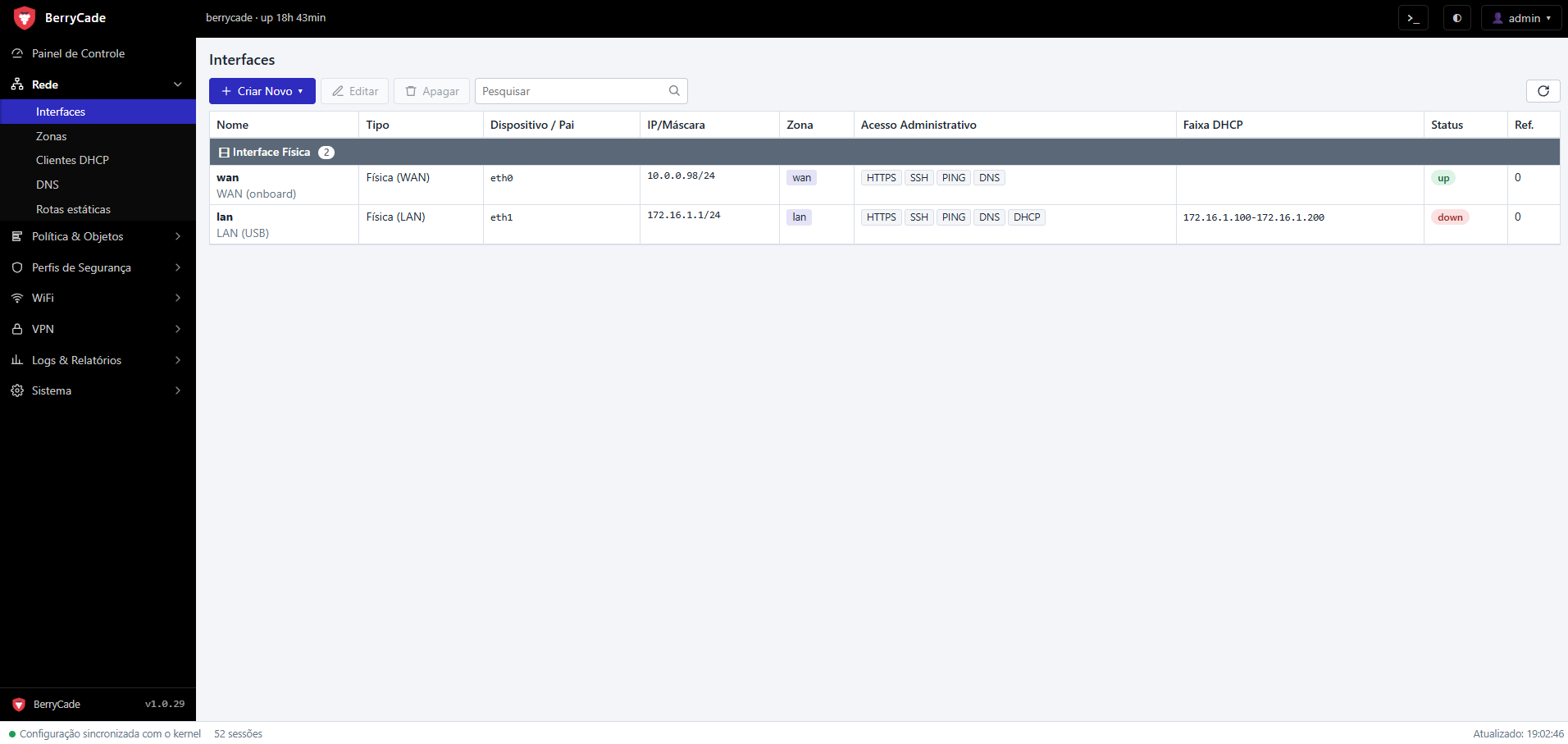
Figure 3 — Interfaces screen (Rede › Interfaces)
Lists the interfaces grouped by type (physical, VLANs, tunnels, Tailscale), with device, IP, zone, allowed administrative access, DHCP range and state. Use Criar Novo (Create New) to add a VLAN, and double-click an interface to edit it.
| Field | Description |
|---|---|
| Apelido / Papel (Alias / Role) | Friendly name of the port and whether it is LAN or WAN. |
| Endereçamento › Modo (Addressing › Mode) | Manual (estático) (manual, static), DHCP (cliente) (DHCP client), PPPoE or Sem IP (no IP). |
| Gateway / Métrica (Gateway / Metric) | Gateway of the static interface and the route priority. |
| PPPoE | ISP username and password, authentication (PAP/CHAP), service name, MTU, install the default route and use the received DNS. |
| MTU | Maximum packet size for the interface. |
| Zone | Zone the interface belongs to. |
| Acesso administrativo (Administrative access) | Firewall services reachable through this interface: HTTPS (panel), SSH, PING, DNS and DHCP. |
| Servidor DHCP (DHCP server) | Enable, start and end of the range, lease time, DNS servers, domain and reservations (MAC → IP). |
802.1Q VLANs
A VLAN is a sub-interface of a physical port with its own ID, IP range and, if you want, its own zone (the form offers to create a zone named after the VLAN). The switch must deliver the VLAN tagged on that port.
5.2 Zones (Zonas)
| Field | Description |
|---|---|
| Nome / Descrição (Name / Description) | Zone identifier used in policies. |
| Tráfego intra-zona (Intra-zone traffic) | Permitir (Allow) or Bloquear (Block) traffic between interfaces in the same zone. |
| IDS/IPS | Zone inspection mode: Desligado (Off), Alerta (IDS) (Alert) or Bloqueio (IPS inline) (Block). |
| Membros (Members) | Interfaces and VLANs that belong to the zone. |
5.3 DHCP clients (Clientes DHCP)
Shows in real time the devices that received an IP from the firewall (IP, MAC, hostname and expiration). Right-click a client to:
- Criar reserva… (Create reservation) — pins that IP to the device (MAC address, reserved IP and interface/VLAN);
- Revogar concessão (Revoke lease) — ends the current lease, forcing the device to request an IP again;
- Banir dispositivo… (Ban device) — prevents the device from getting an IP and using the network, with a reason; Remover banimento (Remove ban) undoes it.
5.4 DNS
- Servidores DNS (DNS servers): forwarders used by the firewall and by clients.
- DNS do provedor (ISP DNS): adds the servers received over PPPoE.
- Domínio local (Local domain): DHCP clients start answering as
host.domínio.
5.5 Static routes (Rotas estáticas)
Routes to networks reachable through another router: destination, gateway, interface and metric.