 BerryCade
 12. Command line
Everything you configure in the panel can also be done from the command line, on the device console or over SSH. In the restricted console or as root, type berrycade <command>.
The Tab key completes commands, sections, names that already exist in the configuration (policies, addresses, zones, interfaces…), fields and possible values. berrycade --help lists all commands and berrycade <command> --help shows the details of each one.
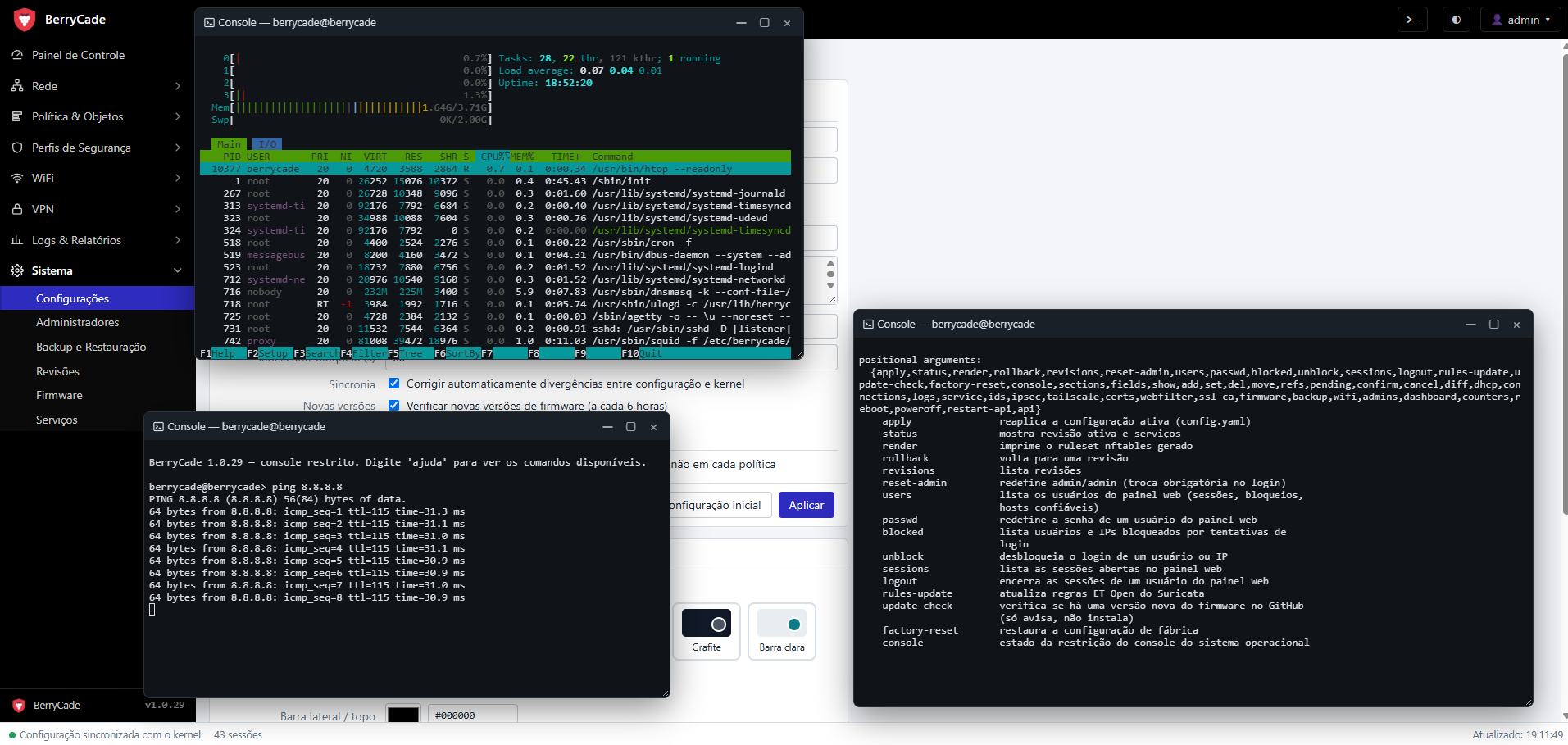
Figure 23 — Panel console: htop, ping and the CLI help
12.1 How changes are applied
The command line uses the same API and the same apply mechanism as the panel:
- validation is the same as in the panel; on an error, the message points to the field and suggests a fix (for example,
campo desconhecido: coment — você quis dizer: comment?, meaning "unknown field: coment — did you mean: comment?"); - each change is recorded in the revision history and in the audit log with the user
cli; - after applying, the CLI asks
Confirmar? [s/N](Confirm? [y/N]). If you don't confirm within the time limit (60 s by default, in Sistema › Configurações (System › Settings)), the previous configuration rolls back automatically. If the change cuts off SSH access, the answer never arrives and nothing is lost; - the
--simoption confirms without asking, for use in scripts. It skips the protection against losing access: use it with care; - when the panel is stopped, the configuration commands don't work. The recovery commands (12.5) remain available.
12.2 Configuration
| Command | What it does |
|---|---|
| berrycade sections | Lists the configuration sections (12.3). |
| berrycade fields <section> | Lists the fields of the section, with their types and possible values. |
| berrycade show <section> [key] | Shows the section as a table, or one complete item. --yaml shows the whole section in YAML. |
| berrycade add <section> field=value … | Creates an item. |
| berrycade set <section> <key> field=value … | Changes fields of an item; the others stay as they are. |
| berrycade set <setting> field=value … | Changes the general settings: system, ids, webfilter and tailscale. |
| berrycade del <section> <key> | Removes an item (refused if it is in use). |
| berrycade refs <section> <key> | Shows what uses an item. |
| berrycade move <section> <key> before|after <other> | Reorders policies (policies) or central NAT rules (snat_rules). |
| berrycade pending · confirm · cancel | Shows, confirms or undoes the change that is waiting for confirmation. |
| berrycade revisions · diff <rev> · rollback <rev> | Revision history, what a revision changed, and rolling back to a revision. |
Field format:
field=value: text, number ortrue/false(alsosim/não);- subfields with a dot:
dhcp_server.enabled=true,admin.https_port=8443; - comma-separated lists:
src_addr=servidor1,servidor2.field+=valueadds to the list andfield-=valueremoves from it; - values with spaces go in quotes:
"comment=Saída para a internet"; field=nullclears an optional field;- web filter categories:
categories.malware=block(ormonitor,allow).
12.3 Configuration sections
| Section | Contents |
|---|---|
| zones | Security zones. |
| interfaces | Physical ports (LAN/WAN), addressing, DHCP and panel access. |
| vlans | 802.1Q VLANs. |
| addresses | Address objects and groups. |
| services | Service objects (ports) and groups. |
| ip_pools | IP pools for source NAT. |
| virtual_ips | Virtual IPs / port forwarding. |
| policies | Firewall policies (order matters). |
| snat_rules | Central NAT (order matters). |
| ipsec | IPsec tunnels. |
| static_routes | Static routes. |
| dhcp_bans | MACs banned from DHCP. |
| device_names | Custom device names. |
| access_points | UniFi access points. |
| webfilter_profiles | Web filter profiles. |
| ssl_profiles | SSL inspection profiles. |
| system (setting) | Name, time zone, DNS, panel port and access, confirmation time limit. |
| ids (setting) | IDS/IPS (Suricata). |
| webfilter (setting) | Automatic update of the web filter lists. |
| tailscale (setting) | Tailscale VPN. |
12.4 Operation
| Command | What it does |
|---|---|
| berrycade dashboard | Device summary: CPU, memory, temperature, interfaces and services. |
| berrycade counters | Bytes and packets per policy. |
| berrycade dhcp clients | DHCP clients (leases, reservations and banned). |
| berrycade dhcp reserve <mac> <ip> <interface> | Reserves an IP (--nome gives the device a name). unreserve <mac> removes it. |
| berrycade dhcp revoke · ban · unban <mac> | Revokes the lease; bans a MAC (--motivo, the reason) or lifts its ban. |
| berrycade connections list · clear | Active sessions (--filtro, --limite); ends all of them or those from --origem <IP>. |
| berrycade logs <type> | traffic, audit, system, webfilter or ids, with --limite and --filtro. For traffic: --tipo accepted|denied and --zona; for system: --servico <unit>. |
| berrycade service list · restart <service> | Service status; restarts one of them. |
| berrycade ids status · alerts · rules-update | IDS/IPS status and rules, recent alerts, rule update. |
| berrycade ids zone <zone> off|alert|block | IDS/IPS mode in a zone. |
| berrycade ipsec status · up · down <tunnel> | Tunnel status; brings a tunnel up or down. |
| berrycade tailscale status · login · logout | Tailscale status and authentication (--auth-key). |
| berrycade certs list · generate · import-ca | IPsec certificates: lists, generates (<name> <CN> [--dias]) or imports a CA (<name> <file.pem>). |
| berrycade webfilter catalog · update · log | Categories and counts, list download (the ones in use or the ones you specify), recent blocks. |
| berrycade webfilter block-page show|reset|set | Block page: shows it, restores the default or uses an HTML file. |
| berrycade ssl-ca show · export · regenerate | SSL inspection CA: details, save to a file (pem, der, crt), generate a new one. |
| berrycade firmware status · check · download | Installed versions and the available one; checks for and downloads a new version. |
| berrycade firmware install · discard · rollback <version> | Installs the uploaded firmware, discards it or rolls back to an earlier version. |
| berrycade backup export <file> | Saves a configuration backup (--senha encrypts it; --sem-admins, --sem-certs). |
| berrycade wifi status · refresh | Access points and Wi-Fi clients. |
| berrycade admins list · add · del · hosts | Panel administrators and their trusted hosts. |
| berrycade reboot · poweroff · restart-api | Restarts or shuts down the device; restarts the panel (they ask for confirmation). |
| berrycade api <method> <path> [field=value …] | Direct access to any panel API route (advanced). |
12.5 Recovery and access
These commands work even when the panel is stopped:
| Command | What it does |
|---|---|
| berrycade status | Shows the active revision and the status of the services. |
| berrycade revisions | Lists the revision history. |
| berrycade rollback <rev> | Rolls back to a revision. |
| berrycade apply | Reapplies the current configuration. |
| berrycade reset-admin | Resets the admin user with the password admin (change required) and ends its sessions. |
| berrycade factory-reset | Restores the factory configuration. |
| berrycade users | Lists the panel users with open sessions, lockouts and trusted hosts. |
| berrycade passwd <user> | Resets the password of a panel user. --temporary generates a temporary password that must be changed. |
| berrycade blocked | Lists users and IPs locked out after failed login attempts. |
| berrycade unblock <user|IP> | Removes a lockout (--all removes all of them). |
| berrycade sessions | Lists the open panel sessions. |
| berrycade logout <user> | Ends a user's sessions. |
| berrycade rules-update | Updates the IDS rules now. |
12.6 Examples
View the policies and the details of the first one:
berrycade show policies
berrycade show policies 1
Create an address object and allow it in policy 1:
berrycade add addresses name=servidor type=subnet value=10.0.0.10/32 "comment=Servidor de arquivos"
berrycade set policies 1 src_addr+=servidor
Create a user VLAN with its own zone and DHCP (the .100–.200 range is filled in automatically):
berrycade add zones name=usuarios "description=VLAN de usuários"
berrycade add vlans name=usuarios parent=lan vid=10 zone=usuarios address=192.168.10.1/24 dhcp_server.enabled=true
General settings, web filter and IDS:
berrycade set system dns.servers=8.8.8.8,1.1.1.1
berrycade set webfilter_profiles Libera_Tudo categories.malware=block
berrycade ids zone lan alert
DHCP, logs and backup:
berrycade dhcp reserve 60:c7:27:08:bb:ae 172.16.1.50 lan --nome notebook
berrycade logs traffic --tipo denied --limite 20
berrycade backup export /root/backup.swbk --senha